Building a CMS Backoffice to Streamline Content Management

Building a CMS Backoffice to Streamline Content Management

Building a CMS Backoffice to Streamline Content Management

Platform

Platform

Web App

Web App

Team

Team

1 PM
1 UX/UI Designer
1 Frontend Developer
2 Backend Developers

1 PM
1 UX/UI Designer
1 Frontend Developer
2 Backend Developers

Role

Role

Founding Designer

Founding Designer

Overview

What is Allen Backoffice?

Allen’s Library is an online learning platform that helps medical students prepare for the Korean Medical Licensing Examination. Allen Backoffice is the content management system (CMS) that manages all the theory and question content used on the platform.

What was the problem?

As the content scaled, managing it via Excel and hardcoding became difficult

1. Overburdened Engineers

1. Overburdened Engineers

The engineering team was responsible for both content-related hardcoding and core feature development. This additional workload often caused delays in delivering essential features.

2. Inefficient Content Management System

2. Inefficient Content Management System

The current content system relied on hardcoding and Excel files, requiring the content team to follow strict formatting rules. Small deviations—such as indentation differences—caused errors, making the workflow error-prone.

3. Delayed Content Updates

3. Delayed Content Updates

When content requires revision, the content team modifies Excel files, which are then hardcoded by developers. This time-consuming process often results in delays in delivering timely content updates.

Current flow of content management

Current flow of content management

Current flow of content management

Solutions

Built a CMS back-office system that enables the content team to directly create, edit, and publish content

1. Independent content management by CMS

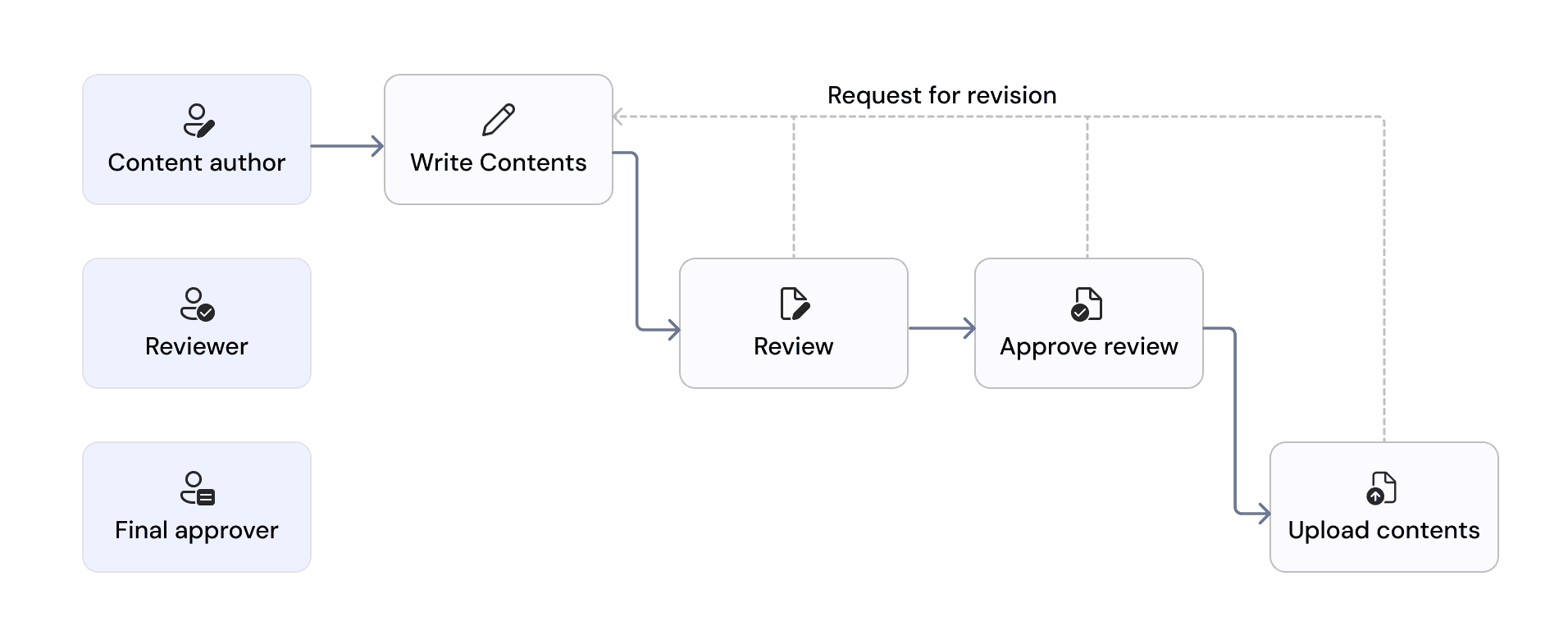
The content team can now write directly in the CMS, and final approvers can publish content, making the upload flow seamless.

The content team can now write directly in the CMS, and final approvers can publish content, making the upload flow seamless.

2. Advanced filtering options for efficient content creation

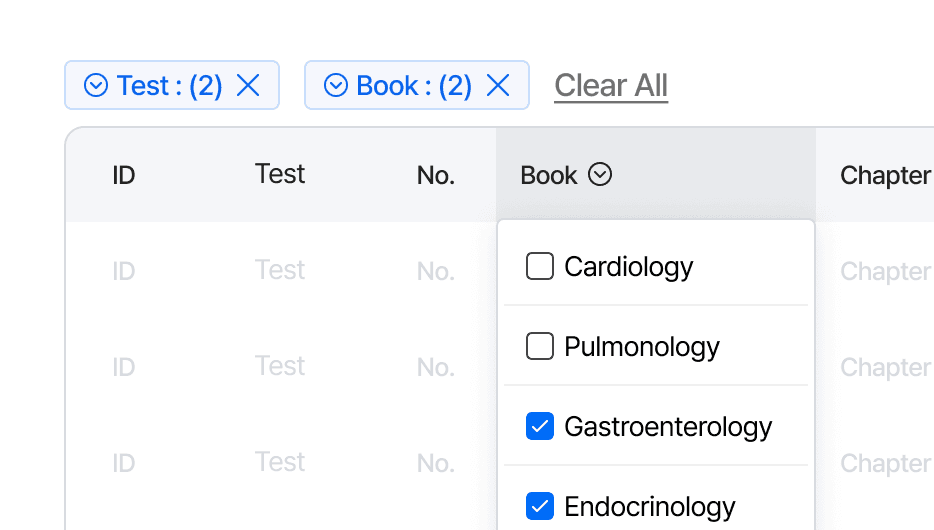
Content creators can use advanced filters in the table header to narrow down and view the specific lists they need to create and refine.

Content creators can use advanced filters in the table header to narrow down and view the specific lists they need to create and refine.

3. Role-based content publishing

Designed the content creation screen header with role-based permissions, allowing only final reviewers to publish content.

Designed the content creation screen header with role-based permissions, allowing only final reviewers to publish content.

Impact

12%

12%

Reduction in engineering requests after implementing the CMS, easing developer workload.

Weekly

Weekly

Content updates the team could now ship on a regular cadence, keeping study materials current for medical students.

Kick-Off Meeting

Established CMS design requirements by understanding backend structure

I initiated a meeting with the PM who designed the backend data structure and managed content via Excel. In this meeting, I gained a thorough understanding of the overall backend structure, including how questions and theories are linked to specific subjects.
Understanding users

Defined content team roles & responsibilities

After a stakeholder meeting, we defined the roles and responsibilities of the content team. The roles—Content author, Reviewer, and Final approver—determined the specific responsibilities of each team member.
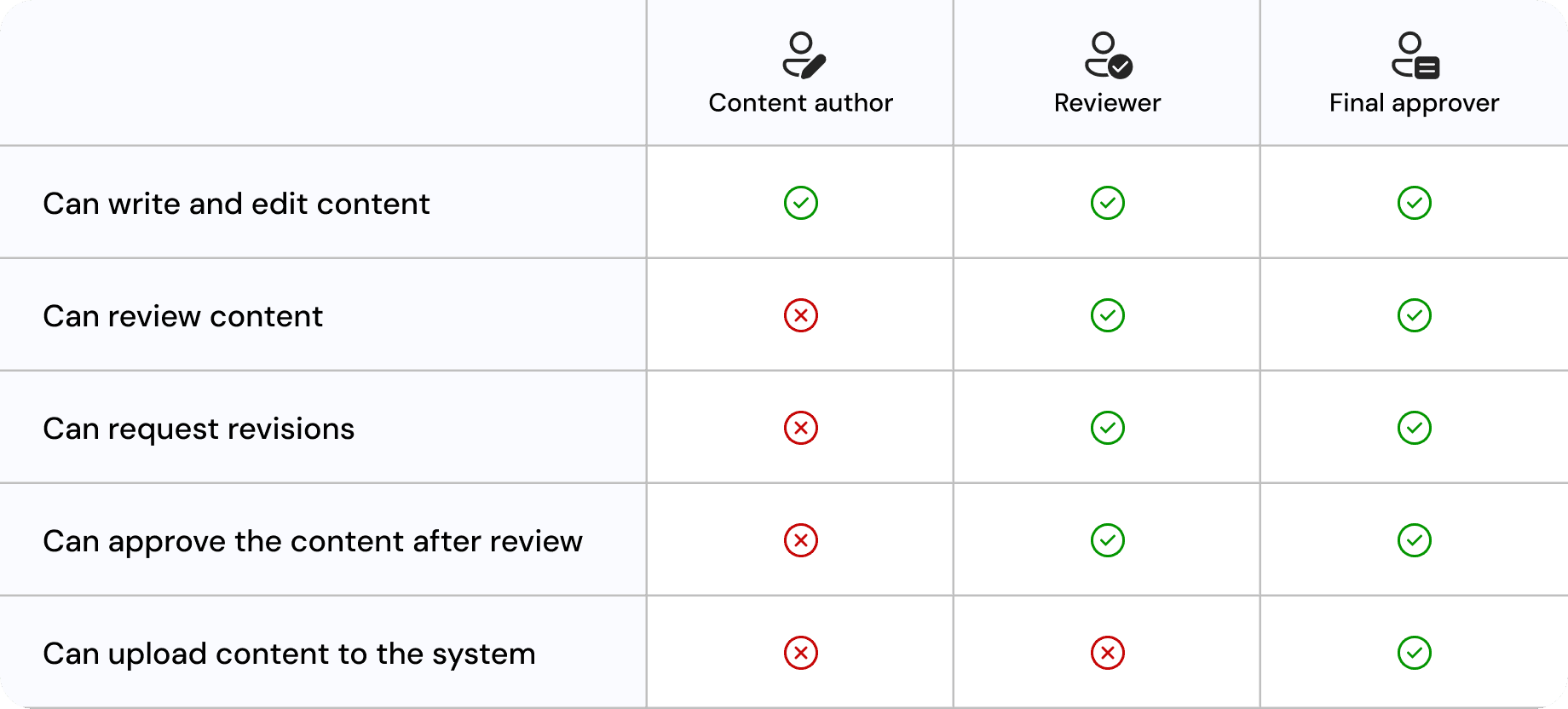
Roles and responsibilities of the content team

Roles and responsibilities of the content team

Created a visualization of the content upload flow according to roles
Ideation

Designed IA based on the service’s content management workflow
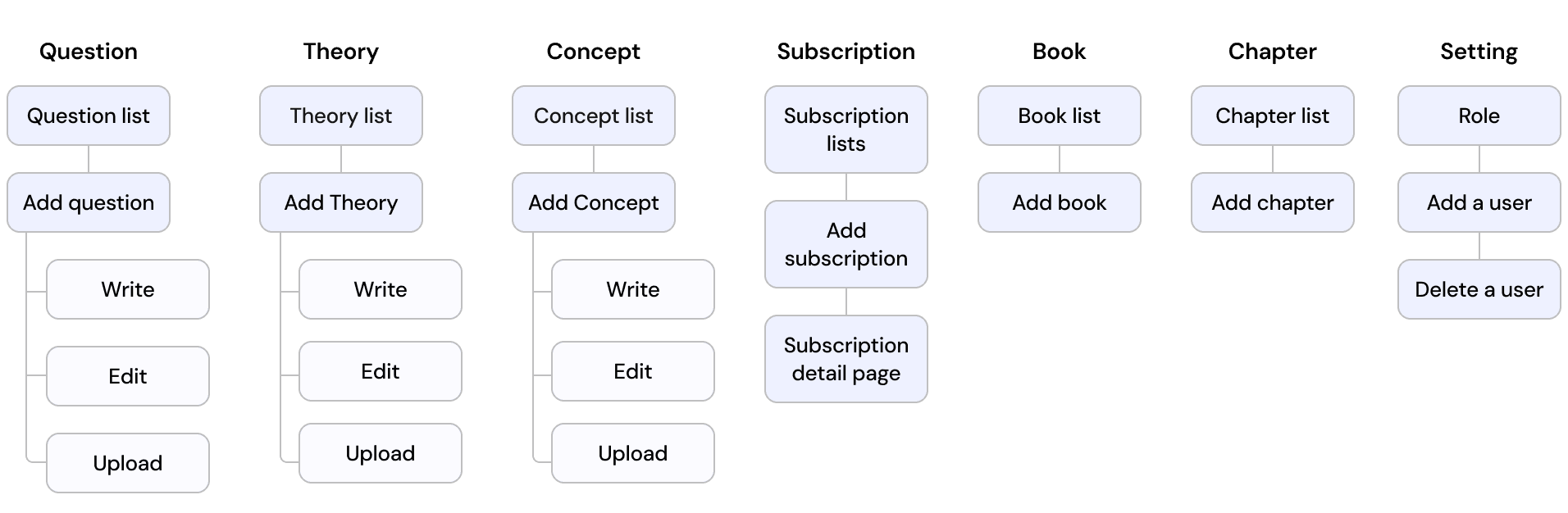
I structured the information architecture to streamline content creation (theory and questions) and system management (books, chapters, subscriptions, and users).

I structured the information architecture to streamline content creation (theory and questions) and system management (books, chapters, subscriptions, and users).

Mid-fi wireframing: identifying gaps and improvements
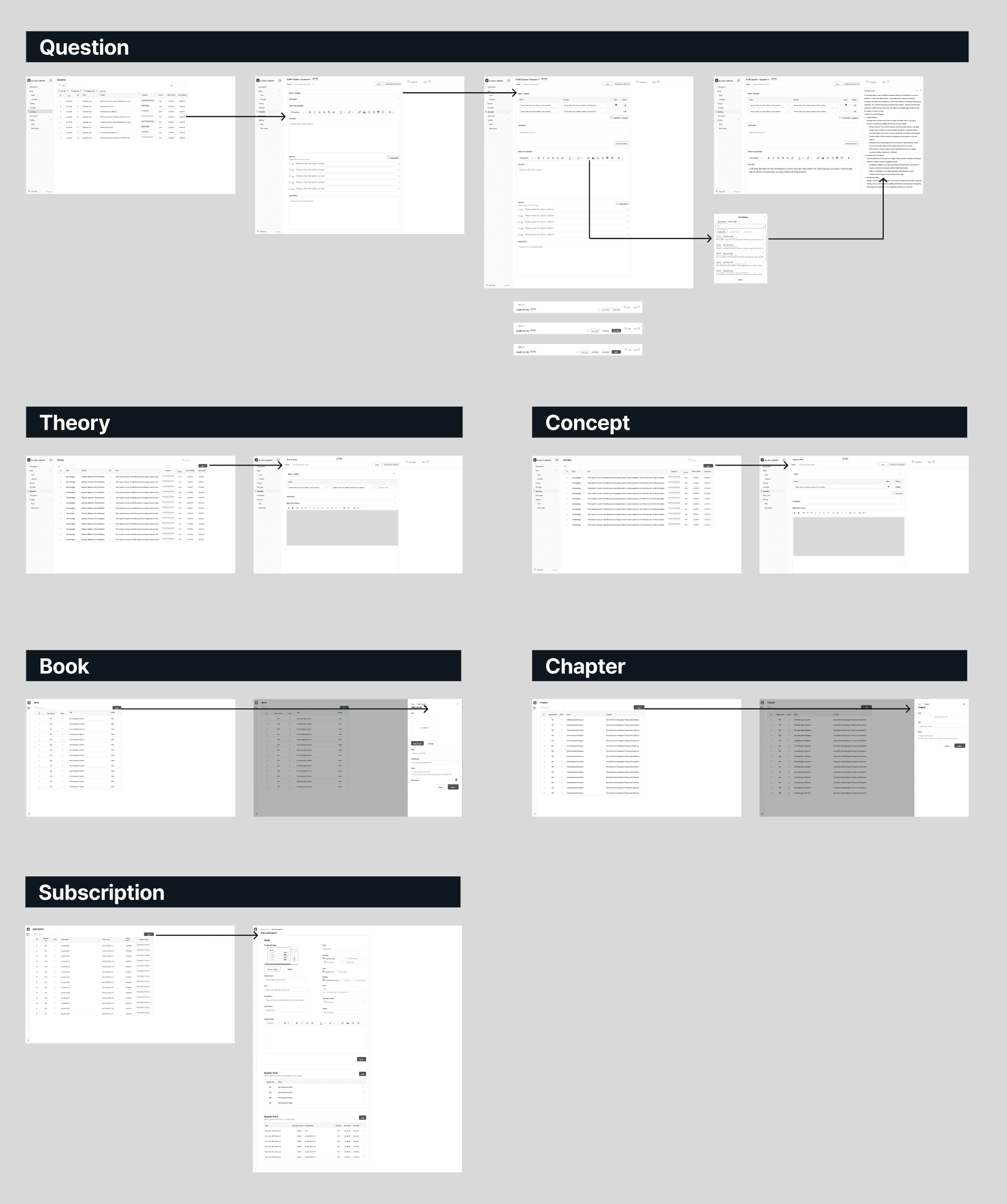
I created a mid-fi wireframe and shared it with my team members. By reviewing it step by step with the PM, we were able to quickly identify any missing functionalities, misaligned flows, or areas needing improvement. This process allowed for flexible iterations before finalizing the design.

I created a mid-fi wireframe and shared it with my team members. By reviewing it step by step with the PM, we were able to quickly identify any missing functionalities, misaligned flows, or areas needing improvement. This process allowed for flexible iterations before finalizing the design.

Design Feedback

Design refinement with the content team and developers

1. Improving content selection with filters and ordering
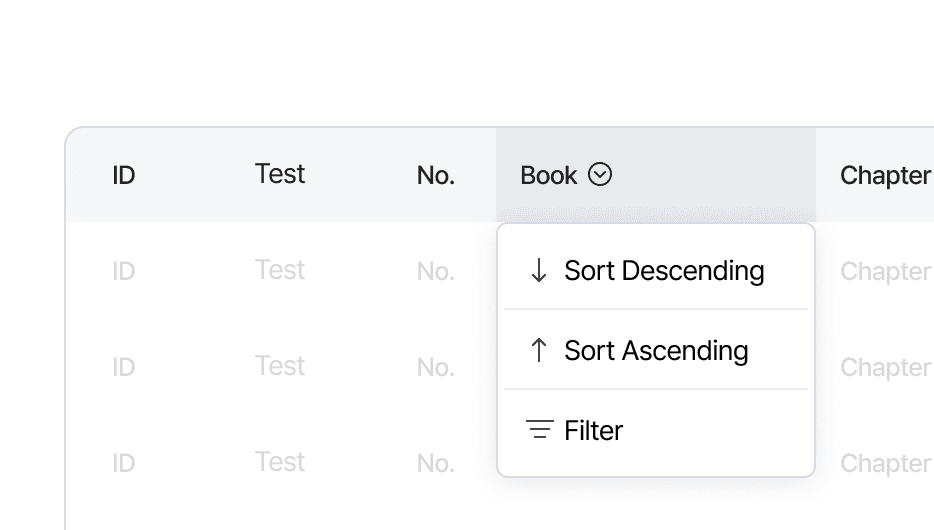
Since each content team member was responsible for different sections, I added filter and sorting functions in the table header, enabling them to quickly view only their assigned content.

Since each content team member was responsible for different sections, I added filter and sorting functions in the table header, enabling them to quickly view only their assigned content.

2. Adjusting author selection placement
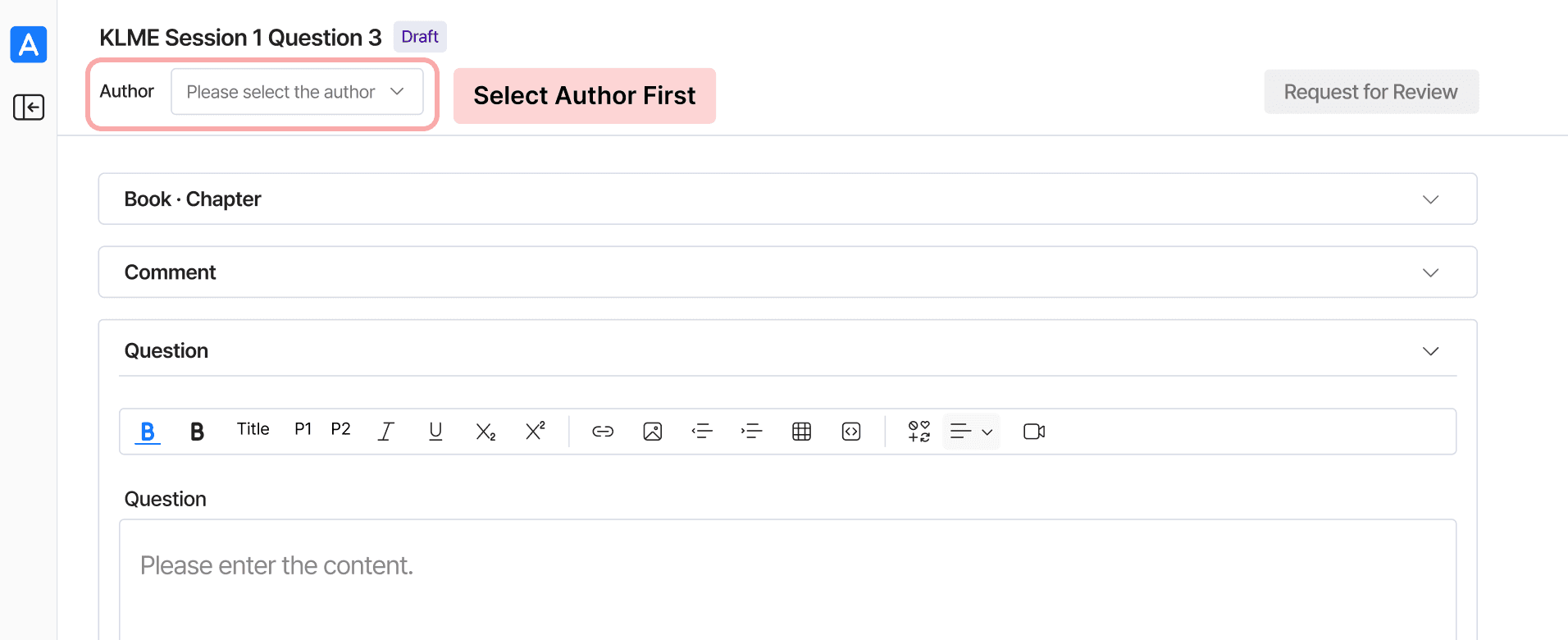
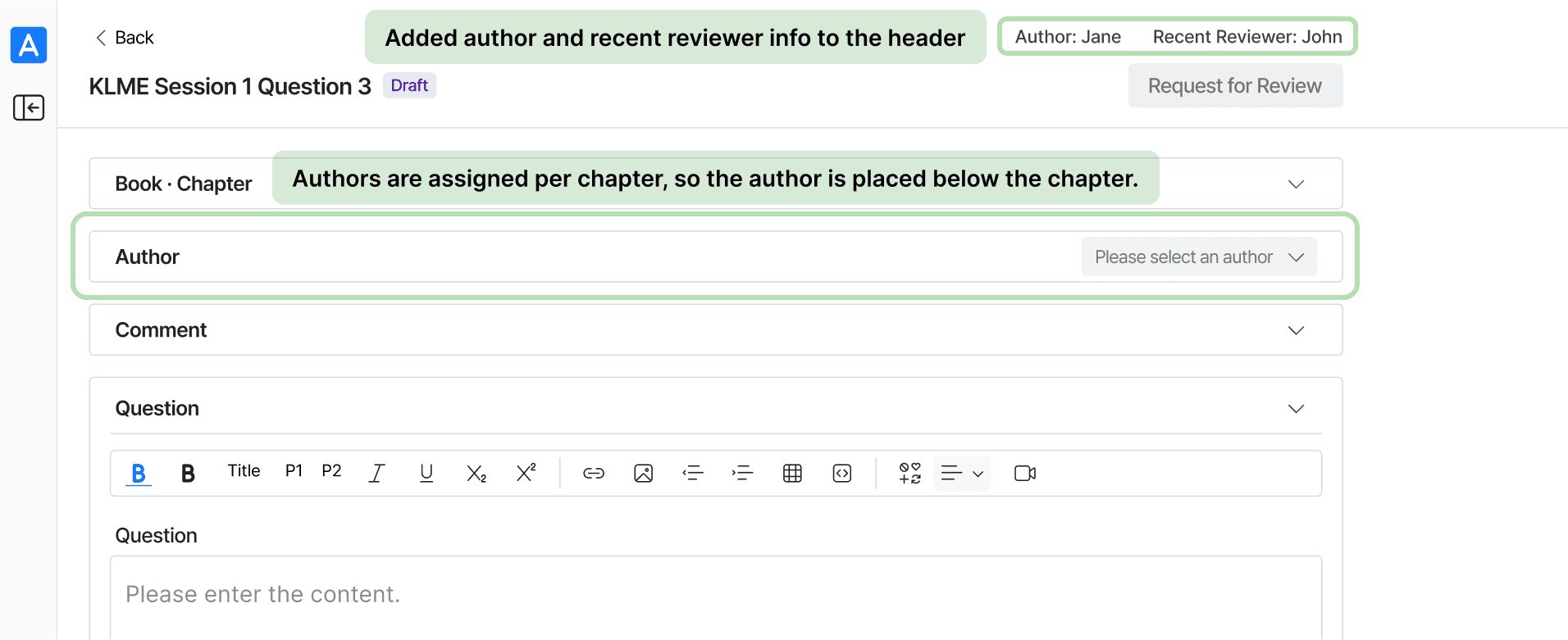
During discussions with developers, we confirmed that author selection is tied to the chosen book and chapter, as each section already has assigned content authors. Accordingly, we adjusted the interface to place the author field below the book and chapter selectors.

During discussions with developers, we confirmed that author selection is tied to the chosen book and chapter, as each section already has assigned content authors. Accordingly, we adjusted the interface to place the author field below the book and chapter selectors.

Final Design

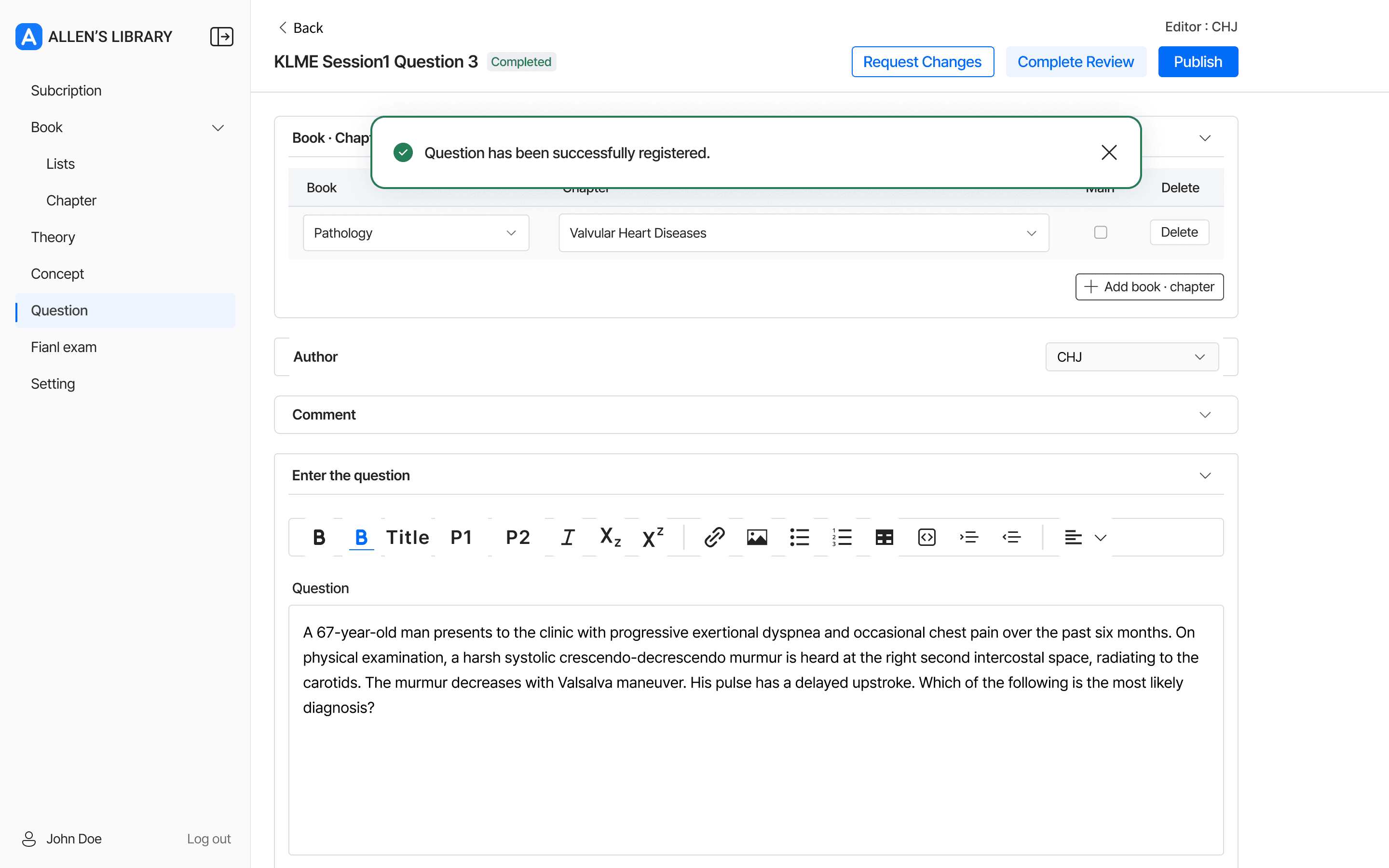
1. Create content directly within the CMS

2. Advanced filtering options for efficient content creation and refinement

3. Role-based content publishing
Key Takeaways

What I learned from this project

1. A deeper understanding of service structure

I was able to better understand how the CMS and the main service interact and how each function is connected. This helped me see the project from a broader perspective and understand the bigger picture.

I was able to better understand how the CMS and the main service interact and how each function is connected. This helped me see the project from a broader perspective and understand the bigger picture.

2. Designing within technical and time constraints

Since the back-office project had lower development priority than the main product, I had to work within time and technical constraints. Through this experience, I learned how to prioritize essential functions and focus on delivering the most critical features first.

Since the back-office project had lower development priority than the main product, I had to work within time and technical constraints. Through this experience, I learned how to prioritize essential functions and focus on delivering the most critical features first.

3. Using kanban system for efficient workflow

I collaborated effectively with developers by using Notion’s Kanban system, which helped manage tasks clearly and maintain smooth communication throughout the project.

I collaborated effectively with developers by using Notion’s Kanban system, which helped manage tasks clearly and maintain smooth communication throughout the project.

Let’s connect!

hannah.design136@gmail.com

Copied

© 2026 Made with tender loving care

Let’s connect!

hannah.design136@gmail.com

Copied

© 2026 Made with tender loving care

Let’s connect!

hannah.design136@gmail.com

Copied

© 2026 Made with tender loving care